

 This is our second post in a series explaining the security practices we are implementing at Openprovider and offering guidance and tips you can follow. In this post, we will talk about best security practices when it comes to managing your contacts.
In the previous post of this series, we discussed how to protect individual contact for the Openprovider reseller control panel. Briefly summarized, our main here advice is to:
- Use strong and unique passwords. Make sure you use unique passwords for each of your accounts, whether they are for business or personal use;
- Change your passwords regularly. Openprovider sends you an automatic reminder for this every 180 days;
- Always use two-factor authentication.
Managing your contacts
In this follow-up blog post we offer some advice for managing your contacts in order to maintain the security of your reseller account in general (RCP and API). The following steps should be part of a regular security audit:
- Login to the RCP with an admin contact. Review the list of current contacts to make sure contact data, especially email addresses, are correct and up to date with employment status. Delete all obsolete contacts.
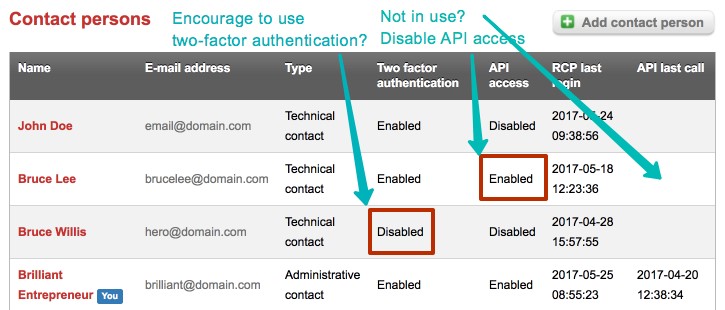
- Make sure that each contact is used by only one person. Create additional accounts if needed.
- Disable API access for each contact where it is not needed. Usually only one account is needed for each integration.
- Make sure that all contacts have two-factor authentication enabled. If needed, educate your staff on the importance of two-factor authentication and how to use it. You can find more information on this in our previous blog post on password security.
- Consider using the IP whitelist functionality to limit RCP and API access to only IP addresses in your network. Developers working from home can access the RCP/API using VPN. To do this, go to RCP->Account->Account Overview-> Select a contact and click Edit.
- Consider using a password manager, like 1Password or Lastpass. A password manager lets you conveniently use and store strong and unique passwords.
0 Views
0 Likes